If you have ever stared at the control panel of a Bosch washing machine and felt overwhelmed by the array of symbols and icons, you are not alone. With so many different options and settings, it can be difficult to decipher what each one means and how it affects the washing cycle. Luckily, we are here to help guide you through the world of Bosch washing machine icons, giving you a clear understanding of their functions and meaning.
One of the most common symbols you will encounter on a Bosch washing machine is the water droplet icon. This symbol indicates the water level that will be used during the wash cycle. A single water droplet typically represents a low water level, while multiple droplets signify a higher water level. It is important to pay attention to this icon, as using the correct water level can ensure that your clothes are properly cleaned and rinsed.
Another frequently seen symbol on Bosch washing machines is the clock icon. This symbol refers to the delay start function, allowing you to set a specific time for the washing cycle to begin. If you have a busy schedule and want to take advantage of lower electricity rates during off-peak hours, the delay start function can be a convenient feature to utilize. Simply set the desired time and let your washing machine do the rest.
In addition to these icons, Bosch washing machines may also display symbols for specific wash programs, such as cotton, delicates, or wool. These icons typically consist of a shirt, a hand, or a sheep, respectively. Each program is designed to provide the optimal wash settings for different types of fabrics, ensuring that your clothes are treated gently and effectively. By understanding these symbols, you can easily navigate through the multitude of wash programs available on your Bosch washing machine.
In conclusion, familiarizing yourself with the symbols and functions of your Bosch washing machine can greatly enhance your laundry experience. Knowing the meaning behind each icon will allow you to make informed decisions when selecting the water level, delay start time, and wash programs. So the next time you start a load of laundry, take a moment to study the icons on your Bosch washing machine and unleash its full potential.
- Understanding the Basics
- Power Button
- Start/Pause Button
- Selector Dial
- Temperature Settings
- Spin Speed
- Common Cleaning Symbols
- Special Care Symbols
- Hand Wash
- Do Not Bleach
- Temperature Settings
- Video on the topic
- Bosch Washing Machine How to Turn Drum Clean Reminder OFF-Bosch Serie 4 VarioPerfect Washing Machine
- Bosch Washing Machine – Tap symbol blinking
- How to tip #16 : Activate and Deactivate Child lock on Samsung Ecobubble Washing Machine.
- How to Clean Your Bosch Washing Machines Filter | service flap
- Answers to frequently asked questions
Understanding the Basics
When it comes to using a Bosch washing machine, it’s important to familiarize yourself with the basic symbols and functions. While the icons may vary from model to model, there are some key symbols that are commonly found on Bosch washing machines.
Power Button

The power button is typically represented by a circle with a line through it. This is used to turn the washing machine on and off.
Start/Pause Button

The start/pause button is usually indicated by a triangle or a play/pause symbol. This button is used to start and pause the wash cycle.
Selector Dial

The selector dial allows you to choose the desired wash program. It is often marked with various icons representing different types of clothing and wash settings. Simply turn the dial to select the appropriate program for your laundry.
Temperature Settings

The temperature settings control the temperature of the water used in the wash cycle. These settings are typically represented by icons depicting hot, warm, and cold water.
Spin Speed

The spin speed setting determines how fast the drum will spin during the spin cycle. This affects how dry your clothes will be at the end of the cycle. Icons representing different levels of spin speed, such as low, medium, and high, are used to indicate the options available.
By understanding these basic symbols and functions, you’ll be able to effectively operate your Bosch washing machine and achieve optimal results with your laundry. It’s always a good idea to refer to the user manual for your specific model for more detailed instructions and information.
Common Cleaning Symbols
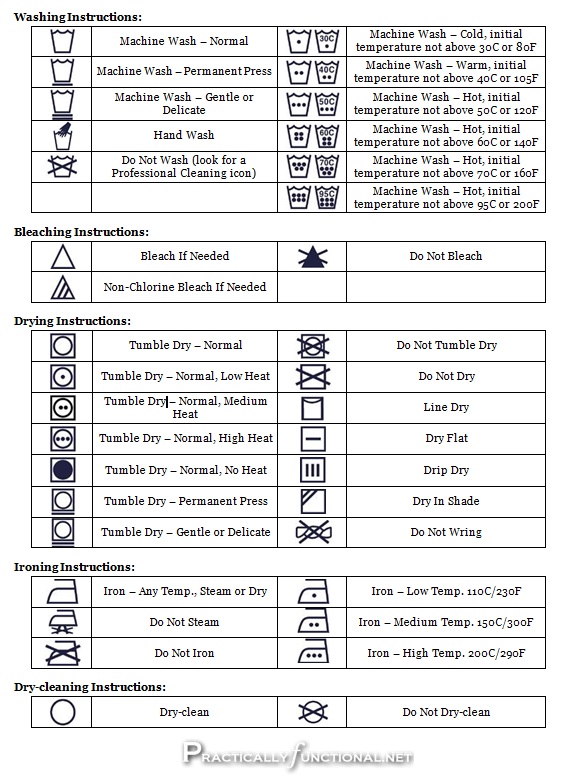
Understanding the cleaning symbols on your Bosch washing machine is important to ensure proper care and maintenance of your laundry. Here are some commonly used cleaning symbols and their meanings:
| Symbol | Meaning |
|---|---|
| Gentle Wash | |
| Normal Wash | |
| Do Not Wash | |
| Hand Wash | |
| Do Not Dry Clean | |
| Dry Clean Only | |
| Do Not Tumble Dry | |
| Tumble Dry Low Heat | |
| Tumble Dry Medium Heat | |
| Tumble Dry High Heat | |
| May Be Ironed | |
| Do Not Iron |
By familiarizing yourself with these common cleaning symbols, you can ensure that you are using the correct settings and caring for your laundry in the best possible way. Always refer to the instruction manual for specific guidance on your Bosch washing machine’s cleaning symbols.
Special Care Symbols

When using a Bosch washing machine, it is important to pay attention to the special care symbols on your clothing labels. These symbols indicate additional care instructions that need to be followed to ensure the longevity and quality of your garments. Here is a guide to the most common special care symbols and what they mean:
Hand Wash
The hand wash symbol is a basin filled with water. It indicates that the item should be hand-washed using a gentle detergent. To hand wash your clothing, fill a sink or basin with cool water and add a small amount of detergent. Gently agitate the item in the water for a few minutes, then rinse and lay flat to dry.
Do Not Bleach

The do not bleach symbol is a triangle crossed out with a diagonal line. This symbol indicates that the item should not be bleached. Avoid using any bleach or bleach-based products when washing or treating this garment.
These are just a few examples of special care symbols you may come across when using a Bosch washing machine. It is important to carefully read and follow the care instructions provided on each clothing label to ensure the best results and prevent damage to your garments.
| Symbol | Description |
|---|---|
| Hand Wash | |
| Do Not Bleach |
Temperature Settings

When using a Bosch washing machine, you have the ability to select the temperature at which you want your laundry to be washed. The temperature setting can greatly affect the outcome and cleanliness of your clothes. Here is a guide to the temperature symbols and functions available on your Bosch washing machine:
- Cold Water: This setting uses only cold water for washing clothes. It is suitable for delicate fabrics that may be sensitive to heat.
- 30 Degrees: This setting uses lukewarm water at a temperature of approximately 30 degrees Celsius. It is suitable for lightly soiled clothes or items that require more gentle washing.
- 40 Degrees: This setting uses warm water at a temperature of approximately 40 degrees Celsius. It is suitable for regular washing of most types of clothing and fabrics.
- 60 Degrees: This setting uses hot water at a temperature of approximately 60 degrees Celsius. It is suitable for washing heavily soiled clothes or items that require a more thorough cleaning.
- 90 Degrees: This setting uses very hot water at a temperature of approximately 90 degrees Celsius. It is suitable for washing items such as bed linens, towels, and other heavily soiled fabrics that require a deep clean.
It is important to note that not all temperature settings are available for every wash program on your Bosch washing machine. The available temperature settings may vary depending on the specific wash program you choose. Refer to your washing machine’s user manual for more detailed information on temperature settings for each wash program.
Video on the topic
Bosch Washing Machine How to Turn Drum Clean Reminder OFF-Bosch Serie 4 VarioPerfect Washing Machine
Bosch Washing Machine – Tap symbol blinking
How to tip #16 : Activate and Deactivate Child lock on Samsung Ecobubble Washing Machine.
How to Clean Your Bosch Washing Machines Filter | service flap
Answers to frequently asked questions
Read more practical tips and expert opinions about modern devices at appliances-news.com. Here you will find answers to questions about any technology.