
Keeping your LG washing machine running smoothly is essential for maintaining clean and fresh clothes. One of the key components that require regular maintenance is the filter. Over time, the filter can become clogged with dirt, lint, and other debris, which can affect the machine’s performance and efficiency. Cleaning the filter is a simple task that should be done periodically to ensure optimal functioning of your LG washing machine.
To start, locate the filter on your LG washing machine. It is usually located at the bottom of the machine, behind a small hatch. Once you have located the filter, make sure the machine is turned off and unplugged before proceeding. This will ensure your safety while cleaning the filter.
Next, open the hatch and carefully remove the filter. Be prepared for some water to come out, so it’s a good idea to have a towel or bucket nearby to catch any excess water. Once the filter is out, inspect it for any visible debris or blockages. Use a brush or your fingers to remove any dirt or lint that may be stuck to the filter.
After cleaning the filter, rinse it under running water to remove any remaining dirt. Make sure to clean both the front and back of the filter thoroughly. Once the filter is clean, carefully place it back into its original position in the machine and close the hatch. Make sure it is securely fastened to prevent any leaks.
In conclusion, cleaning the filter in your LG washing machine is a simple but crucial task that should not be overlooked. By following these step-by-step instructions, you can ensure that your machine continues to run efficiently and provides you with clean and fresh clothes every time.
- The importance of cleaning the filter in an LG washing machine
- Step 1: Gather necessary materials
- 1. Screwdriver
- 2. Bucket or bowl
- 3. Towels or rags
- 4. Cleaning solution
- 5. Gloves
- List of materials needed to clean the filter
- Step 2: Locate the filter
- Simple steps to find the filter in your LG washing machine
- Step 3: Remove the filter
- How to remove the filter from your LG washing machine
- Video on the topic
- [LG Frontload Washers] Cleaning the Drain Pump Filter
- How to clean magic filter in LG washing machine | 6 easy steps
- [Front Load Washer] Cleaning the Water Inlet Filters
- [LG Front Load Washers] Cleaning The Drain Filter
- Answers to frequently asked questions
The importance of cleaning the filter in an LG washing machine
Regularly cleaning the filter in your LG washing machine is of utmost importance to ensure its optimal performance and longevity. The filter plays a crucial role in trapping lint, hair, and other debris that may accumulate during the wash cycle. If the filter becomes clogged, it can hinder the machine’s ability to drain properly and may even lead to potential damages.
By cleaning the filter regularly, you can prevent these issues and maintain the efficiency of your LG washing machine. Additionally, a clean filter ensures that your clothes are thoroughly cleaned and rinsed, as any debris trapped in the filter can potentially transfer back onto your garments.
Furthermore, neglecting to clean the filter can result in unpleasant odors emanating from your washing machine. The buildup of trapped debris and moisture in the filter can create a breeding ground for bacteria and mold, leading to an unpleasant smell that can transfer to your freshly washed clothes.
Ensuring that the filter is clean also helps in preventing potential mechanical and electrical problems in your LG washing machine. A clogged filter can cause the machine to work harder, leading to excessive strain on its components and potentially reducing its overall lifespan. By regularly cleaning the filter, you can avoid expensive repairs and extend the life of your LG washing machine.
In conclusion, maintaining a regular cleaning routine for the filter in your LG washing machine is crucial for its proper functioning, efficiency, and longevity. By taking a few minutes to clean the filter, you can prevent clogs, maintain cleanliness, avoid unpleasant odors, and even save money on repairs in the long run. Don’t overlook this essential step to ensure that your LG washing machine continues to deliver excellent washing performance for years to come.
Step 1: Gather necessary materials
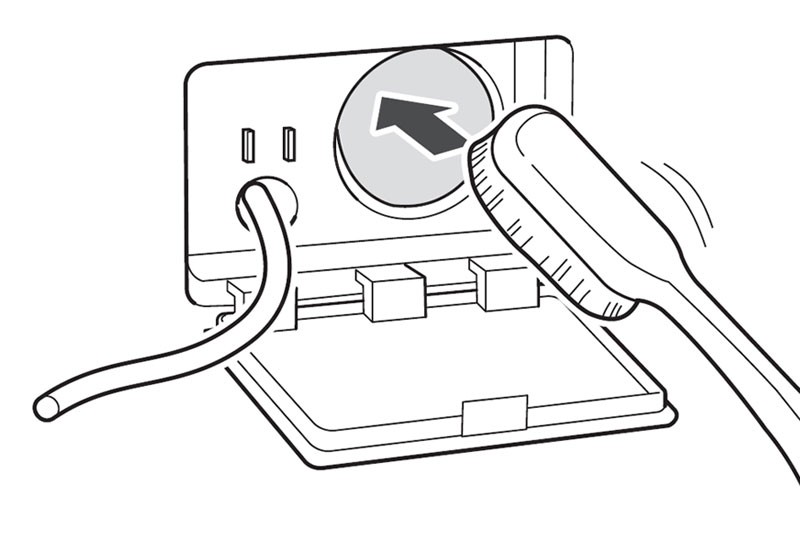
Before starting the process of cleaning the filter in your LG washing machine, it’s important to gather all the necessary materials. Having all the required items at hand will ensure a smooth and hassle-free experience. Here are the essential materials you will need:
1. Screwdriver
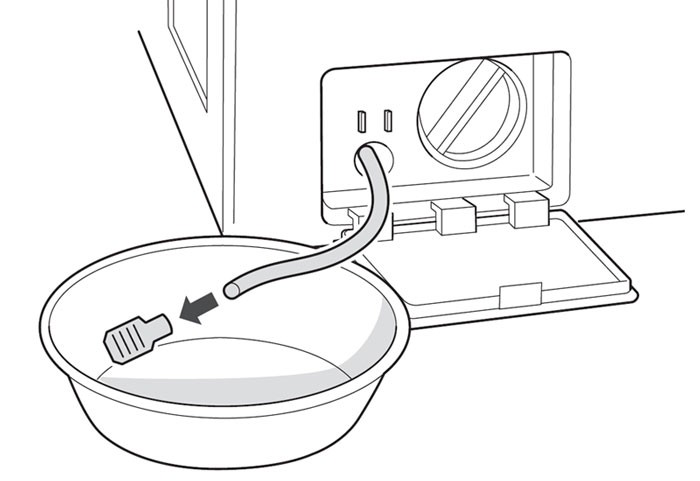
A screwdriver is needed to remove the panel or cover that gives you access to the filter. Make sure you have the right type and size of screwdriver for your specific washing machine model.
2. Bucket or bowl

You will need a bucket or bowl to collect any water that may come out when you remove the filter. This will help prevent any mess or water damage to your laundry area.
3. Towels or rags
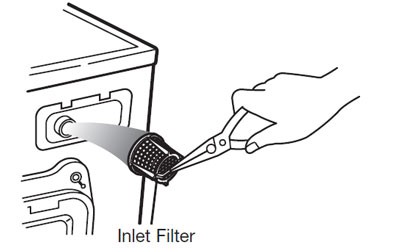
Having towels or rags nearby will be useful for cleaning up any spills or water that may escape during the filter cleaning process. They will also come in handy for wiping down the filter and surrounding areas.
4. Cleaning solution

Using a cleaning solution specifically designed for washing machines will help remove any build-up or residue from the filter. You can find these solutions at appliance stores or online. Alternatively, you can make your own cleaning solution by mixing equal parts of water and vinegar.
5. Gloves

While cleaning the filter, it is a good idea to wear gloves to protect your hands from any dirt, debris, or cleaning solutions that may be present. This will also help maintain hygiene and prevent any skin irritation.
Once you have gathered all the necessary materials, you’ll be ready to move on to the next step of cleaning the filter in your LG washing machine.
List of materials needed to clean the filter

To clean the filter in your LG washing machine, you will need the following materials:
- Phillips head screwdriver: This will be used to remove the screws that hold the filter cover in place.
- Dish soap: You will need dish soap to clean the filter, as it helps to break down any grime or residue that may have built up.
- Cleaning brush: A cleaning brush with soft bristles will be useful for scrubbing away any stubborn dirt or debris that is stuck to the filter.
- Clean cloth or towel: You will need a clean cloth or towel to wipe down the filter and surrounding area after it has been cleaned.
- Bucket or basin: It’s a good idea to have a bucket or basin nearby to catch any water that may have accumulated in the filter or washing machine when it is removed.
Make sure to gather all of these materials before you begin the cleaning process to ensure a smooth and efficient filter cleaning.
Step 2: Locate the filter
Locating the filter in your LG washing machine is an important step in the cleaning process. Follow these simple instructions to find the filter:
1. Turn off the washing machine: Before locating the filter, make sure the washing machine is switched off and unplugged. Safety should always come first.
2. Open the door or lid: Depending on the model of your LG washing machine, the filter can be located either behind a small door at the front of the machine or inside the drum when you open the lid.
3. Check the user manual: If you’re having trouble finding the filter, it’s always a good idea to consult the user manual. The manual will provide specific instructions on how to locate and access the filter for your particular model.
4. Look for a cylindrical or rectangular compartment: In most LG washing machines, the filter is in the form of a small cylindrical or rectangular compartment. It may be labeled as “filter” or “lint filter.”
5. Remove any obstacles: Clear away any clothes or debris that may be blocking access to the filter. This will make it easier to remove and clean the filter.
6. Familiarize yourself with the filter: Take a moment to inspect the filter and understand how it is attached to the washing machine. This will help you in the next steps of the cleaning process.
Once you have located the filter, you can move on to the next step of the cleaning process. Make sure to refer to your user manual for any specific instructions or precautions related to your LG washing machine model.
Simple steps to find the filter in your LG washing machine
If you are having issues with your LG washing machine, it is important to check the filter as it can become clogged with lint, hair, and other debris over time. Cleaning the filter regularly can help improve the performance of your washing machine and prevent any potential issues. Here are the simple steps to find the filter in your LG washing machine:
Step 1: Turn off the power
Before you begin, make sure to turn off the power to your LG washing machine. This is an important safety precaution to avoid any accidents during the cleaning process.
Step 2: Locate the filter
The location of the filter may vary depending on the model of your LG washing machine. In most cases, the filter is located at the bottom front of the machine. Look for a small rectangular or circular cover with a tab or handle that you can pull or twist to open.
Step 3: Open the filter cover
Once you have located the filter, gently pull or twist the tab or handle to open the filter cover. Be careful not to force it, as it may break. If you are unsure, consult your LG washing machine’s manual for specific instructions.
Step 4: Remove the filter
After opening the filter cover, you will see the filter inside. It is usually a small mesh or net-like object. Carefully pull out the filter by gripping it with your fingers or using a pair of pliers if necessary.
Step 5: Clean the filter
Once you have removed the filter, inspect it for any signs of debris or clogs. Use your fingers or a soft brush to gently remove any lint, hair, or other particles from the filter. Make sure to clean it thoroughly and remove any stubborn dirt.
Step 6: Reinstall the filter
After cleaning the filter, insert it back into its original position inside the washing machine. Make sure it is securely in place and properly aligned with the filter cover.
Step 7: Close the filter cover
Once the filter is back in place, gently close the filter cover by pushing or twisting the tab or handle. Ensure that it is securely closed to prevent any leaks or issues during washing.
Step 8: Turn on the power
Finally, turn on the power to your LG washing machine and run a test cycle to ensure that everything is working properly. If you notice any problems, check the filter again and repeat the cleaning process if necessary.
By following these simple steps, you can easily find and clean the filter in your LG washing machine, keeping it running efficiently and effectively for years to come.
Step 3: Remove the filter
Once you have accessed the filter location, it’s time to remove it for cleaning. Follow these steps:
| A. | Rotate the filter counterclockwise to unscrew it from the washing machine. |
| B. | Slowly pull the filter out from its housing. |
| C. | Inspect the filter for any visible debris or build-up. |
Take note of the position and orientation of the filter, as you’ll need to reattach it correctly later on.
If the filter is difficult to remove, or if you encounter any resistance, do not force it. Instead, consult the user manual or contact LG customer support for further assistance.
How to remove the filter from your LG washing machine

Removing the filter from your LG washing machine is a simple process that can help keep your machine running smoothly and efficiently. Follow these steps to remove the filter:
- Locate the filter. The filter is typically located on the front or the bottom of the washing machine. Refer to your LG washing machine’s user manual for the exact location.
- Turn off the washing machine. Before removing the filter, it’s important to turn off the power to the machine to avoid any accidents.
- Open the filter door. Once the machine is powered off, open the filter door. This may involve sliding a panel or simply pulling the door open, depending on the model of your LG washing machine.
- Remove any visible debris. Inspect the filter for any visible debris such as lint, hair, or coins. Use a cloth or paper towel to wipe away any debris that you can reach.
- Unscrew the filter. Using your hand or a pair of pliers, unscrew the filter in a counterclockwise motion. Be gentle to avoid damaging the filter or the washing machine.
- Pull out the filter. Once the filter is unscrewed, carefully pull it out of the washing machine. Be cautious of any remaining water that may be inside the filter.
- Clean the filter. Rinse the filter under running water to remove any remaining debris. Use a soft brush to scrub away any stubborn dirt or buildup.
- Inspect the filter housing. While the filter is out, take a moment to inspect the filter housing for any signs of damage or blockage. Clean the housing if necessary.
- Reinstall the filter. Once the filter and housing are clean, carefully place the filter back into the housing. Screw it in clockwise until it is securely in place.
- Close the filter door. Close the filter door or panel, making sure it is properly secured. If needed, refer to your LG washing machine’s user manual for instructions on how to properly close the filter door.
By regularly removing and cleaning the filter in your LG washing machine, you can ensure that your machine continues to function properly and efficiently, helping to extend its lifespan and maintain the cleanliness of your clothes.
Video on the topic
[LG Frontload Washers] Cleaning the Drain Pump Filter
How to clean magic filter in LG washing machine | 6 easy steps
[Front Load Washer] Cleaning the Water Inlet Filters
[LG Front Load Washers] Cleaning The Drain Filter
Answers to frequently asked questions
Read more practical tips and expert opinions about modern devices at appliances-news.com. Here you will find answers to questions about any technology.


